Travel packing apps eliminate pre-trip anxiety by generating itemized checklists based on destination weather, planned activities, trip duration, and luggage constraints. By replacing paper lists with dynamic digital tools, these applications help travelers prevent forgotten essentials, optimize bag weight, and establish reusable systems for efficient travel planning.
The Core Mechanisms of Modern Travel Packing Apps
Digital packing applications solve a persistent problem: matching personal inventory with variable environmental conditions. Traditional pen-and-paper methods rely entirely on memory, making them vulnerable to forgotten items, overpacking, and poor adjustment for local forecasts. Modern packing software eliminates these vulnerabilities through structured database management and predictive rules.
At their core, these applications operate using three distinct architectural models:
- Algorithmic Generators: These apps ingest parameters such as destination coordinates, travel dates, flight constraints, and planned activities (e.g., formal dining, hiking, swimming). The software queries live weather services to determine predicted temperature ranges and precipitation levels, cross-referencing this data against a built-in matrix of luggage recommendations.
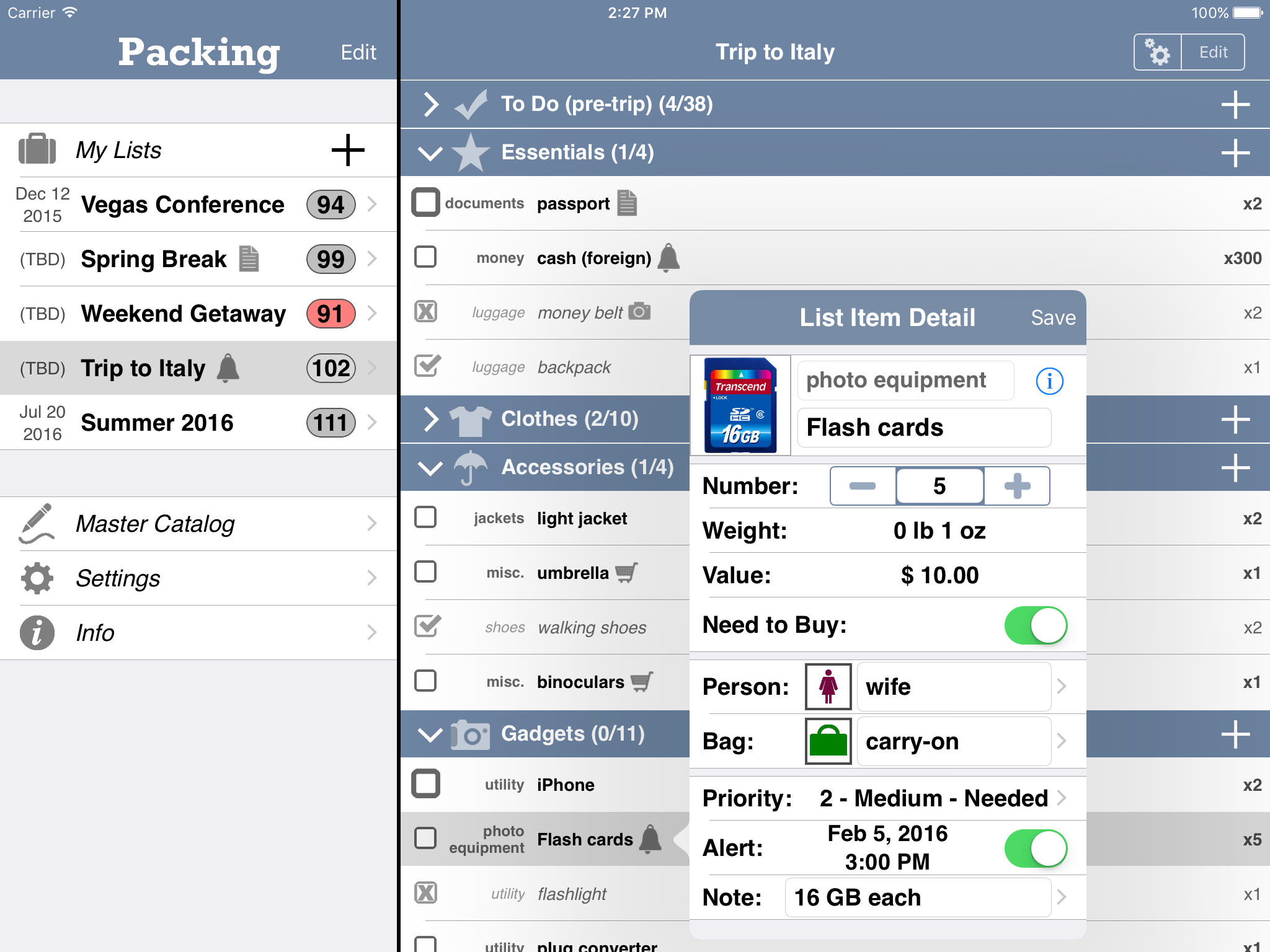
- Template-Based Managers: These tools function as specialized database systems. Users construct modular baseline templates—such as "Standard International Carry-On" or "Weekend Camping"—and clone them for specific itineraries, manually adjusting item quantities as needed.
- Wardrobe Digitization Platforms: These applications combine inventory management with visual closet cataloging. Users photograph personal garments, categorize them by climate suitability and formality, and build visual packing capsules linked directly to trip calendars.
Understanding these underlying mechanisms makes it easier to select a tool that fits your travel frequency, packing philosophy, and technical preferences.
In-Depth Analysis of Leading Travel Packing Applications
Selecting the right application requires evaluating platform compatibility, offline functionality, feature depth, and pricing models. Below is an examination of the dominant options available across mobile platforms.
- User Inputs
- Destination & Dates
- Trip Type
- Activities
- Laundry Access
- Processing Engine
- Weather API Integration
- Rule-Based Category Filtering
- Output Checklist
- Essentials & Tech
- Formality Matrix
- Climate Gear
PackPoint: Best for Automated, Weather-Integrated Intelligence
PackPoint remains one of the most widely used automated packing applications due to its minimal user configuration requirements. Upon launching the app, users enter their destination city, departure date, duration of stay, and gender preference, along with specific activities such as business meetings, gym workouts, or beach visits.
- Weather Integration: PackPoint connects directly to global meteorological forecasts, automatically adjusting recommendations if rain, snow, or extreme heat is predicted during the scheduled trip dates.
- Smart Parameters: The app accounts for laundry availability. Selecting the option to wash clothes mid-trip automatically cuts recommended garment counts in half.
- Ecosystem Integration: PackPoint links with trip management platforms like TripIt, allowing it to parse itineraries automatically and create matching packing lists without manual data entry.
- Limitations: The free tier restricts custom item additions to baseline lists. Unlocking full customization and TripIt integration requires purchasing PackPoint Premium.
PackKing: Best for Activity-Specific Customization
PackKing caters to active travelers who need detailed lists tailored to specific sports, hobbies, or complex itineraries. Unlike basic list applications, PackKing organizes items around activity modules rather than static clothing categories.
- Contextual Rule Generation: Users define parameters such as transport mode (airplane, car, motorcycle), accommodation type (hotel, hostel, camping), and specialized activities (diving, photography, baby care). The app then filters its database to suggest equipment tailored to those precise conditions.
- Weight and Volume Awareness: PackKing provides explicit prompts regarding luggage restrictions based on chosen transit modes, reducing the risk of unexpected airline bag fees.
- Custom Customization: Users can edit master database entries, ensuring that personalized items—such as specific camera lenses or medical equipment—appear automatically whenever a relevant activity is selected.
PackTeo: Best for Offline Use and Template Architecture
For privacy-focused travelers or those frequently operating without cellular data, PackTeo offers an offline-first solution built around modular templates.
- Modular Template Building: PackTeo operates on a system of preset catalogs (e.g., "Basic Documents," "Tropical Hygiene," "Cold Weather Outerwear") that users can stack together to build custom checklists for any journey.
- Data Privacy: Because PackTeo stores lists locally on the device rather than requiring server synchronization, it functions reliably in remote areas without risking personal data exposure.
- Export and Sharing: Users can export finalized checklists as text documents or PDF files, making it easy to share packing lists with family members who do not have the app installed.
General Task Managers (Todoist, TickTick, Apple Reminders)
While dedicated packing apps offer automated convenience, general-purpose task managers offer unmatched flexibility for users who prefer full control over their workflows.
- Reusable Master Lists: By creating an uncheckable "Master Travel" project, users can duplicate baseline task lists for each new trip.
- Sub-task Hierarchies: Task managers excel at nested organization. For example, a main item titled "Dopp Kit" can contain sub-tasks for toothpaste, razor, contacts, and prescription medication, ensuring small items are not overlooked.
- Cross-Platform Ubiquity: General task managers sync across desktop computers, tablets, and smartwatches, allowing travelers to review packing tasks across all their devices.
Technical and Feature Comparison
The following matrix compares key features, system requirements, and operational models across top packing tools:
| Application | Primary Architecture | Weather API Sync | Custom Templates | Offline Reliability | Multi-User Sharing | Ecosystem Integrations |
|---|---|---|---|---|---|---|
| PackPoint | Algorithmic / Dynamic | Yes (Automatic) | Limited (Free) / Full (Paid) | High (after load) | Premium Only | TripIt, Evernote |
| PackKing | Activity-Driven Rule Engine | Partial | High | Excellent | Text/PDF Export | None |
| PackTeo | Modular Database Templates | No | High | Absolute (Local) | Export Only | Local System File |
| Todoist | Hierarchical Task List | No | Unlimited | Excellent | Native Co-editing | Zapier, Google Calendar |
| Smart Closet | Visual Wardrobe Management | No | High | High | Export Only | System Camera, Cloud Storage |
Step-by-Step System: Building a Permanent Digital Packing Workflow
To get the most out of a packing application, avoid creating lists from scratch for every trip. Follow this systematic workflow to create a scalable digital packing process.
- Step 1: Conduct Inventory Audit
- Catalog essential gear, electronics, documents, and Dopp kit items.
- Step 2: Construct Core Master Templates
- Build modular baselines (e.g., 3-Day Business, 7-Day Warm Weather).
- Step 3: Define Luggage Parameters & Weight Caps
- Set hard item thresholds based on airline carry-on or checked limits.
- Step 4: Instantiate Trip & Sync Conditions
- Input destination weather forecast, duration, and activity tags.
- Step 5: Execute Two-Stage Verification
- Audit items during initial layout, then check off during physical bag load.
1. Conduct a Base Inventory Audit
Before downloading or configuring an app, record your non-negotiable travel items. This includes:
- Core technology (chargers, cables, power banks, international adapters).
- Toiletry baselines (liquids under 100ml / 3.4oz for carry-on compliance).
- Critical documentation (passport, global entry cards, travel insurance, prescriptions).
2. Construct Modular Core Templates
Create master lists categorized by travel type rather than individual destinations. Essential baselines include:
- The 3-Day Warm-Weather Carry-On: Optimized for short domestic trips.
- The International Long-Haul: Includes adapter plugs, backup payment methods, offline media, and long-flight comfort items.
- The Extreme Weather Module: Contains technical layering, waterproof shell gear, and specialized outerwear.
3. Establish Luggage Constraints Early
Specify your baggage allowance inside your chosen application before populating items. If flying budget carriers across regions like Europe or Southeast Asia, strict carry-on weight limits (often 7kg to 10kg total) require setting hard caps on total clothing items.
4. Instantiate the Trip and Cross-Reference Weather
One week prior to departure, initialize your trip within the app. Allow the weather integration to pull initial forecasts. Adjust item counts based on predicted rain percentages, extreme temperature swings, or planned formal events.
5. Execute Two-Stage Verification
Avoid checking off items as you think of them. Instead, use a strict two-stage process:
- Stage A (Staging): Mark items as ready when laid out on a bed or packing table.
- Stage B (Loading): Check items off inside the app only as they physically enter your suitcase or backpack.
Advanced Strategies: Wardrobe Integration and Weight Management
For frequent travelers, advanced digital packing goes beyond basic checklists. Combining packing software with visual wardrobe managers and physical scale measurements creates an optimized, lightweight travel setup.
Capsule Wardrobe Strategy
Integrating visual applications like Smart Closet or Stylebook allows travelers to maximize outfit combinations while minimizing physical baggage.
- [ 3 Tops ] × [ 2 Bottoms ] × [ 2 Outer Layers ]
- 12 Unique Outfit Combinations
By cataloging versatile garments that adhere to a unified color palette (such as navy, charcoal, and neutrals), a 7-day trip can easily be completed using a small carry-on without repeating full outfits.
Weight Distribution and Gear Auditing
Underpacking is generally safer than overpacking, but missing critical gear can lead to costly destination purchases. Using a digital luggage scale in combination with app-based weight notes helps maintain an optimized load:
- Log Base Weight: Record the empty weight of your suitcase or backpack within your app notes.
- Tag Heavy Items: Use your app to flag heavy items, such as boots or heavy jackets. Plan to wear these during transit days to keep your bag weight within airline limits.
- Post-Trip Audit: Immediately after returning home, review your digital checklist. Mark any items that went unused during the trip. If an item was not used (excluding emergency medical or safety gear), remove it from your master template for future trips.
Common Packing Mistakes and Troubleshooting
Even with powerful software, user error can lead to poor packing decisions. Here is how to avoid common pitfalls:
1. Over-Reliance on Unverified Forecasts
Automated weather integrations pull data based on regional averages. However, microclimates in mountainous or coastal areas can deviate significantly from regional forecasts.
- Solution: Check forecasts 10 days out, but re-verify 24 hours before departure. Always maintain a baseline layer—such as a lightweight windbreaker or merino wool top—regardless of warm forecasts.
2. Forgetting Charging and Cable Ecosystems
Listing "Phone Charger" often leads to forgetting necessary cables, wall blocks, or watch pucks.
- Solution: Structure electronics in your app using precise parent-child sub-lists:
- Phone Kit
- USB-C to Lightning / USB-C Cable (x2)
- 65W GaN Dual-Port Wall Charger
- Portable 10,000mAh Battery Pack
- Phone Kit
3. Ignoring Regional Regulations and Standard Changes
Travelers often assume luggage rules are universal. However, international carriers frequently enforce stricter dimensions and liquid restrictions than domestic airlines. For updated guidance on baggage security and liquid compliance, consult official transport security protocols directly via the U.S. Transportation Security Administration (TSA) or equivalent international aviation authorities.
- Solution: Add dedicated fields or tags to your app templates indicating restricted items, hazardous materials (like lithium-ion batteries), and specific carry-on limits for your airline.
Frequently Asked Questions
Do travel packing apps work without an active internet connection?
Yes, most top travel packing apps feature robust offline functionality. Apps like PackTeo store data locally on your device by default. Cloud-synchronized apps like PackPoint, Todoist, and PackKing allow you to access and edit existing checklists offline; however, weather forecasts and active itinerary sync will require an internet connection to update.
How do packing apps adjust lists for unexpected weather changes?
Apps with live weather integration query global meteorological networks using your destination coordinates and travel dates. If a sudden cold front or rain system enters the forecast, the app dynamically adds items such as umbrellas, rain jackets, or thermal layers, while adjusting short-sleeved clothing counts down accordingly.
Is a dedicated packing app better than a general task manager?
Dedicated packing apps excel at speed and automated contextual advice, making them ideal for travelers who want immediate, low-effort lists based on weather and destination data. General task managers (like Todoist or Apple Reminders) require more manual setup initially, but offer superior custom organization, sub-task structures, and cross-platform syncing for power users.
Can I share packing lists with family members or group travelers?
Yes, but the sharing method depends on the application. Task platforms like Todoist support real-time collaborative editing. Dedicated packing apps often require a premium subscription to share live digital lists, though most offer free exporting options to convert checklists into PDFs or shareable text messages.
How do I prevent overpacking when using an automated list generator?
Automated tools tend to suggest conservative, safety-first item counts. To prevent overpacking, use the app's laundry setting to cut clothing estimates in half, stick strictly to a defined color palette, and perform a post-trip audit in the app to remove unused items from future master templates.
Strategic Action Plan: Deploying Your Digital Packing System
To convert this guide into a practical, repeatable travel system, execute the following steps before your next trip:
- Select Your Application Core: Choose an automated generator like PackPoint for quick setup, or a template manager like PackTeo or Todoist if you prefer complete control.
- Build a "Never-Remove" Essentials List: Create a core module containing critical documents, medication, core electronics, and primary toiletries. This list should remain identical regardless of destination.
- Set Up a Single Test Itinerary: Input an upcoming trip or mock weekend getaway. Run the app's weather generator or manually apply your core template.
- Conduct a Dry-Run Packing Session: Lay out all generated items physically. Weigh the packed container using a luggage scale and record the final weight in the app.
- Audit After Return: Within 24 hours of returning home, open the app and delete items that were not used. Refine your master templates to make your next trip lighter and more efficient.