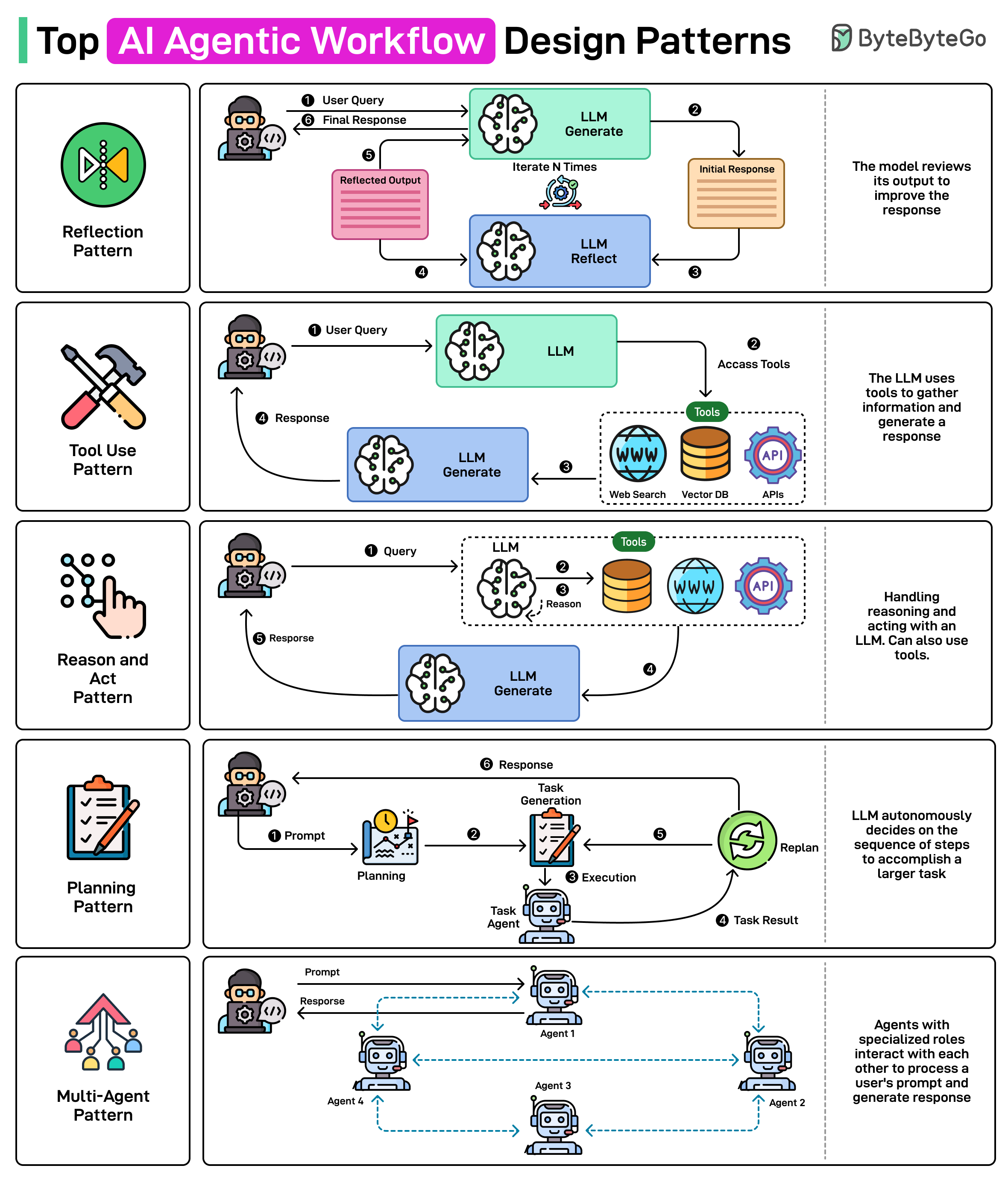
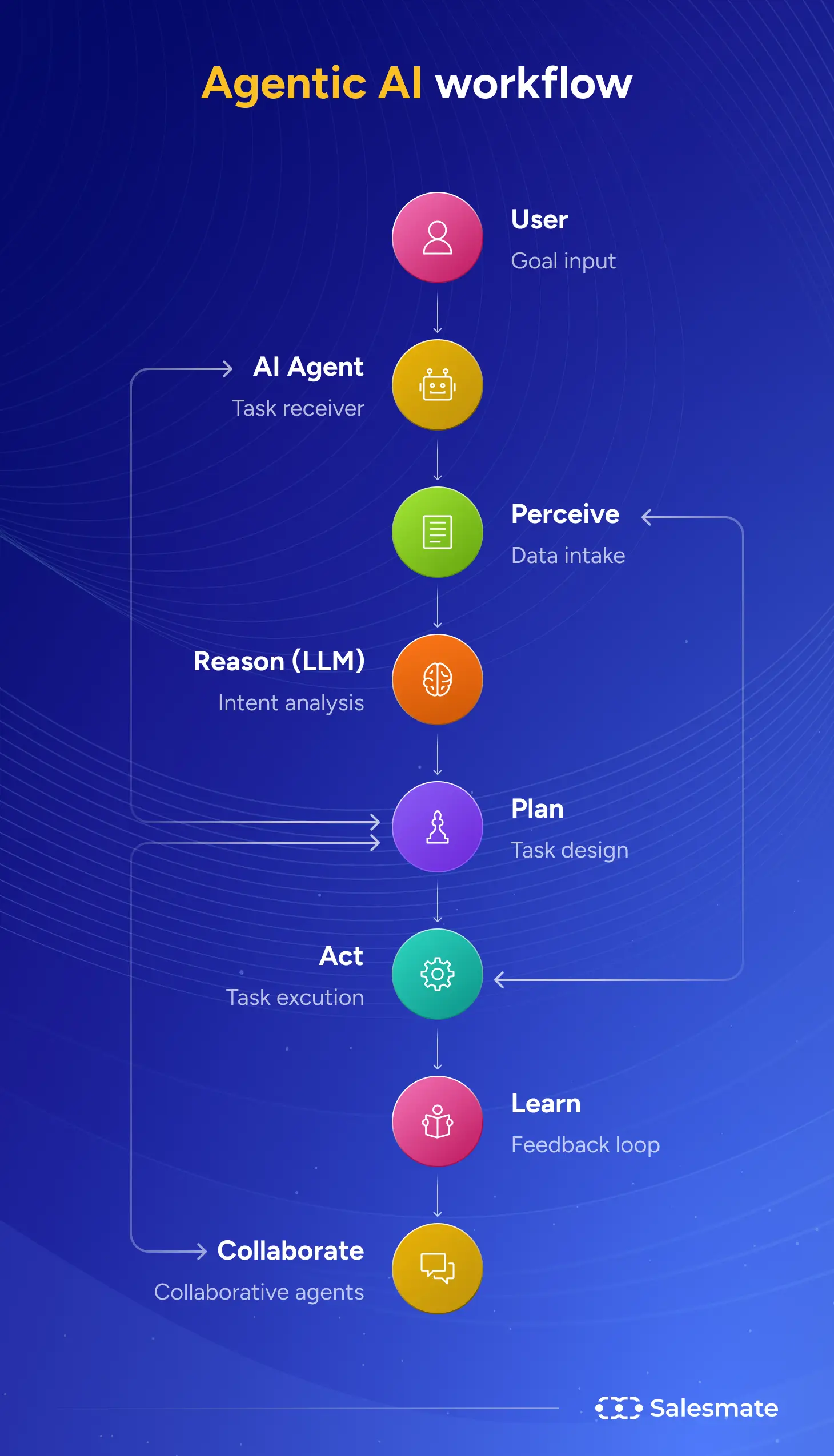
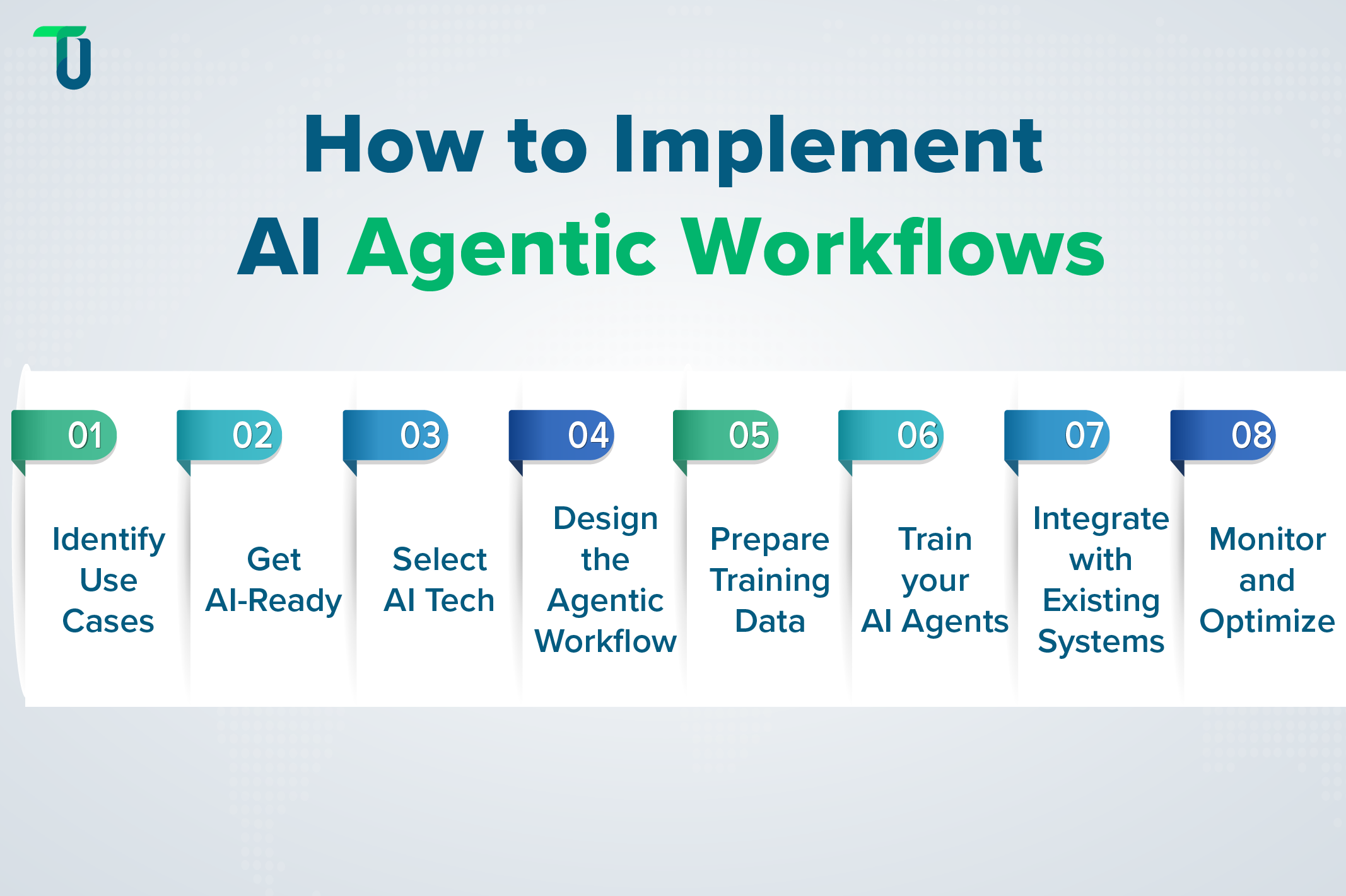
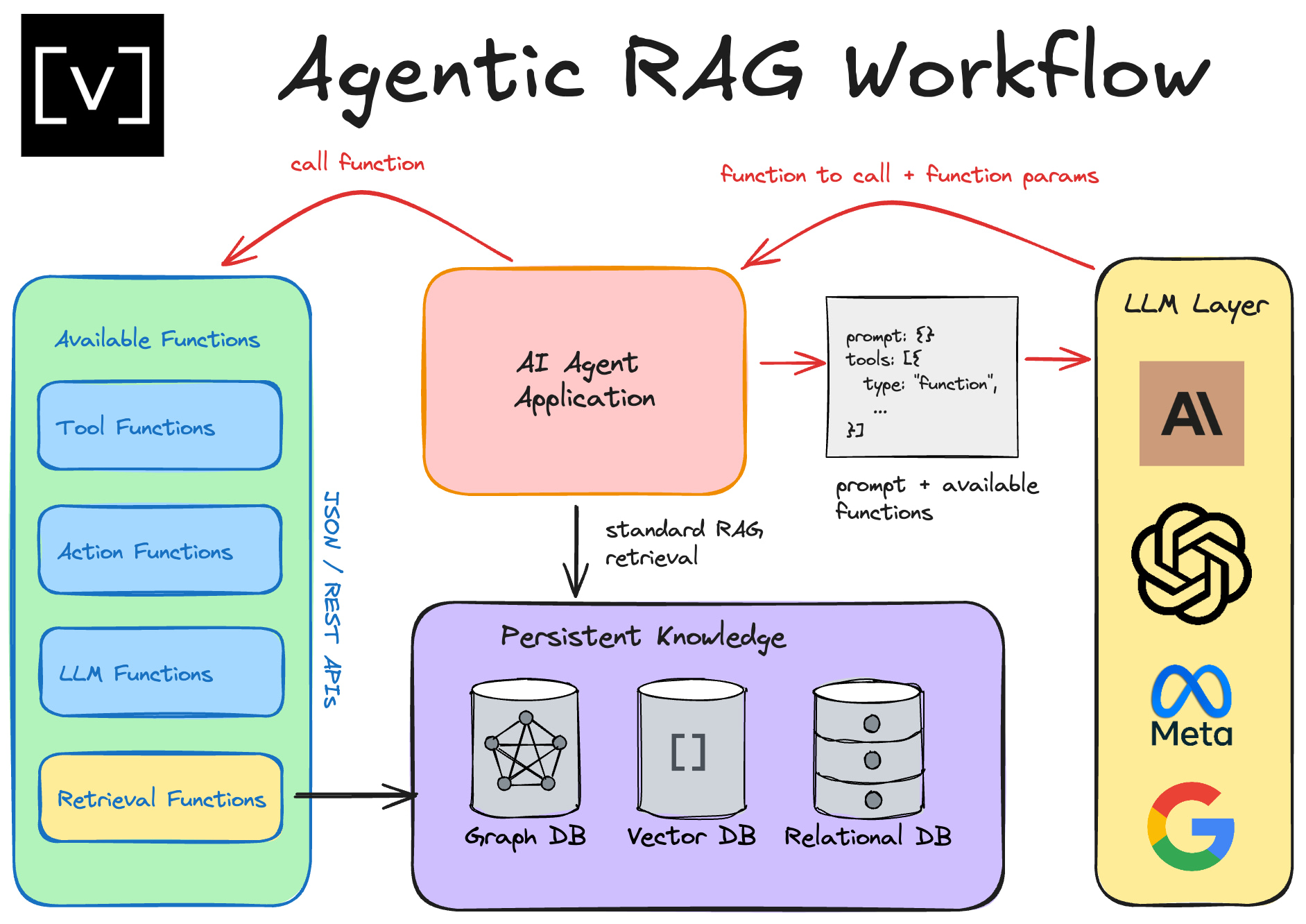
An agentic workflow is a design pattern in software development where large language models (LLMs) operate as autonomous agents, capable of breaking down complex tasks, selecting tools, and executing multi-step processes with minimal human intervention. By shifting from prompt-response interactions to iterative, goal-oriented cycles, these systems can perform research, data analysis, and code execution by dynamically adjusting their strategy based on the feedback from previous steps.
The Shift from Linear Prompts to Agentic Loops
Traditional LLM interactions are typically linear: a user provides a prompt, the model processes it, and the model returns a static output. This approach is highly effective for summarization or creative drafting but fails when the task requires multiple layers of reasoning, external verification, or sequential tool execution. An agentic workflow transforms this interaction into a closed-loop system.
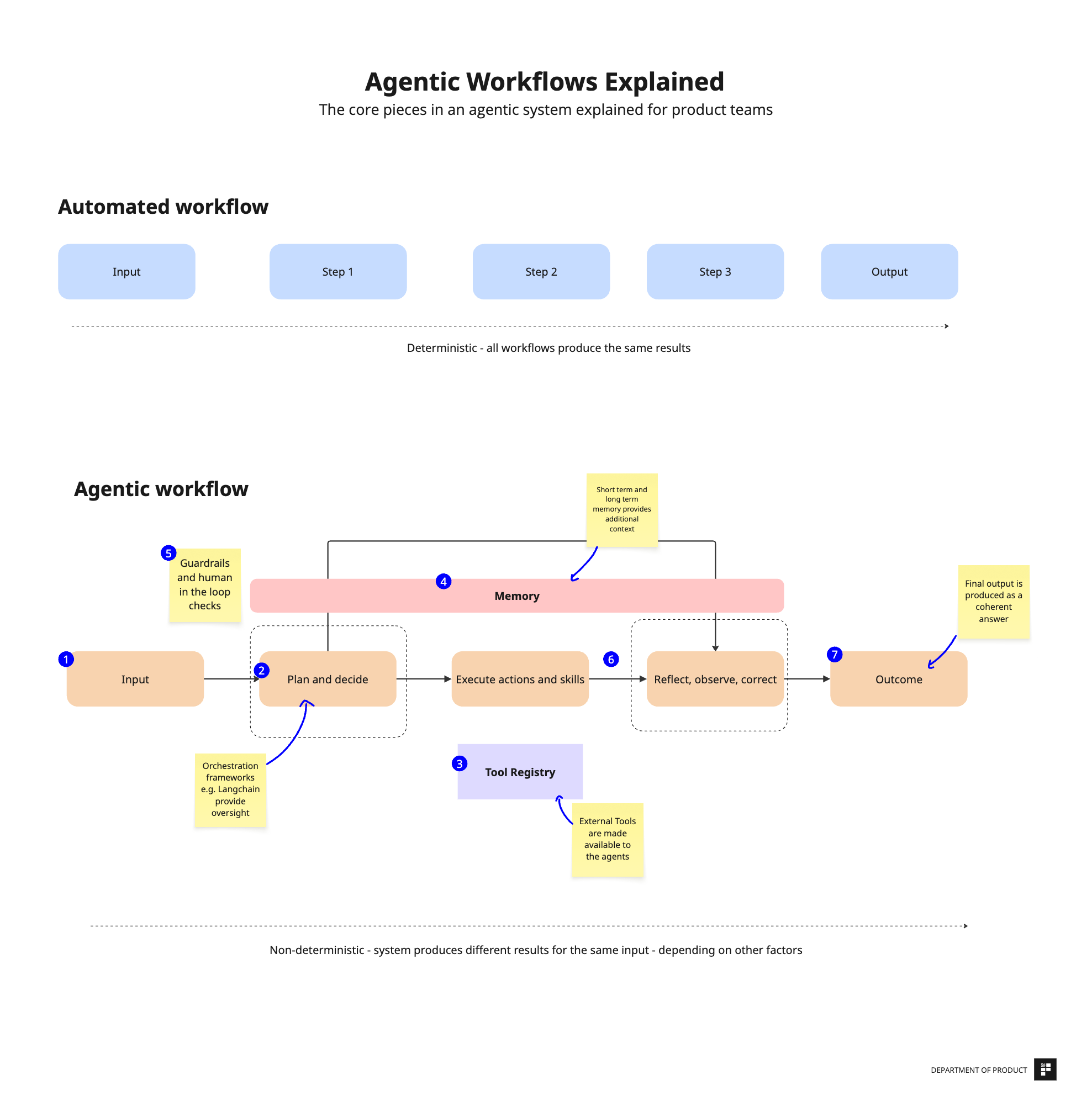
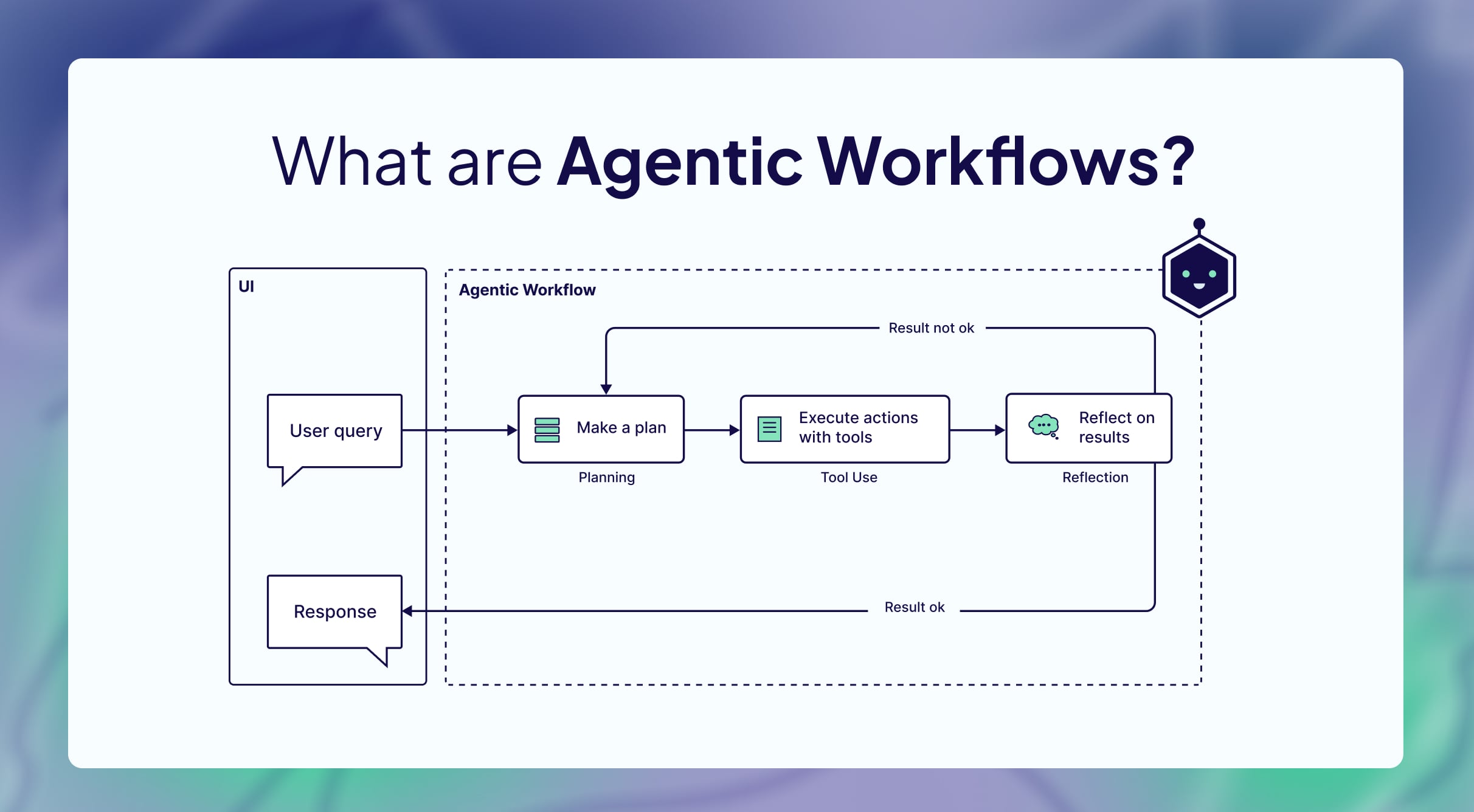
In this architecture, the model functions as the "brain," connected to a set of specific tools—such as web browsers, file system access, or calculation engines—and a "memory" component that tracks the state of the task. Instead of completing a request in one go, the agent evaluates the objective, attempts a step, observes the result, and iterates if the objective remains unmet. This iterative capability is what defines the "agentic" nature of the workflow; it is an active, persistent attempt to reach a goal rather than a passive generation of text.
Core Components of an Agentic Architecture
To implement an effective agentic workflow, developers must define clear boundaries and operational parameters. Without these, agents can easily fall into "infinite loops" where they repeat the same ineffective action, or worse, execute unauthorized operations.
- The Planner (Reasoning Engine): This is the core LLM responsible for decomposing the high-level objective into actionable sub-tasks. It must be capable of multi-step logical reasoning to identify which steps are required to reach the goal.
- Tool Registry (Execution Layer): Agents require defined interfaces to interact with the external world. These tools must be explicitly scoped; an agent should only have access to the specific APIs, databases, or sandboxed environments necessary to perform its assigned duties.
- Observation Feedback (State Management): Crucial to the agentic workflow is the ability to ingest the results of tool calls. If a tool returns an error or incomplete data, the agent must be able to parse that feedback and determine whether to retry with modified parameters or pivot to an alternative path.
- Memory (Context Persistence): Unlike stateless chat interfaces, agentic workflows require long-term and short-term memory to maintain context over hours or days of processing. This is typically managed through vector databases or persistent session logs.
Comparative Framework: Agentic vs. Standard Automation
Understanding the difference between traditional rule-based automation and agentic workflows is critical for selecting the right technical stack for a business or research problem.
| Feature | Traditional Automation | Agentic Workflow |
|---|---|---|
| Logic Type | If-Then hard-coded rules | Probabilistic, goal-oriented reasoning |
| Adaptability | Rigid, requires manual updates | High, adapts to unexpected inputs |
| Error Handling | Predetermined branch paths | Self-correcting feedback loops |
| Implementation | Low overhead, highly predictable | Complex, requires extensive testing |
| Use Case | Routine, repetitive data entry | Creative, multi-step problem solving |
Requirements for Reliable Implementation
Deploying an agentic workflow in a professional setting requires rigorous safety and reliability controls. As of 2026, the industry standard focuses on "Human-in-the-Loop" (HITL) configurations for sensitive operations. You should never grant an agent unrestricted access to critical infrastructure without predefined safety gates.
Technical Prerequisites:
- Sandboxed Execution: Run code generated by agents in isolated environments like containers or virtual machines to prevent system-level compromise.
- Rate Limiting and Cost Controls: Agentic loops can consume large amounts of API tokens. Establish firm token limits and monitoring to prevent runaway costs during iterative cycles.
- Observability Logs: Every step taken by the agent must be logged. When an agent fails, you must be able to trace back through the "thought process" to identify where the reasoning deviated from the intended objective.
- Validation Steps: Integrate automated tests that verify the output of each tool call against expected schema types or data formats before the agent proceeds to the next phase.
Common Obstacles and Troubleshooting Strategies
The most frequent issue encountered in agentic workflows is "hallucinated tool selection." This happens when the model misinterprets the documentation of a tool and attempts to pass invalid arguments.
If your agent is failing, analyze the "thought logs." Often, the issue is not the logic itself, but the lack of clarity in the tool descriptions provided to the agent. Improving the system prompt—specifically the parts describing what each tool does and when to call it—is often more effective than attempting to retrain the underlying model.
Another frequent failure mode is the "looping trap." If the agent performs an action, gets a negative result, and simply performs the exact same action again, it lacks the logic to recognize the failure state. To solve this, introduce a "max retries" count per sub-task and include a constraint in the system prompt that forces the agent to formulate a different approach if the same tool fails more than twice.
How to Begin Building Your First Agentic Workflow
Start small by defining a single, well-bounded objective. Do not attempt to build a "general-purpose agent" immediately. Begin by creating a workflow that handles a single recurring task, such as monitoring a specific data source for changes and summarizing those changes into a draft report.
- Define the Scope: What is the exact output required?
- Select the Toolset: Which APIs or internal scripts are required to gather information for this task?
- Draft the System Prompt: Clearly articulate the role of the agent, the constraints of the tools, and the criteria for success.
- Implement Logging: Ensure you have full visibility into the agent’s reasoning steps.
- Review and Iterate: Once the agent successfully completes the task 80% of the time, add more complexity.
Frequently Asked Questions
What is the difference between an LLM and an Agentic Workflow?
An LLM is a model that predicts the next token in a sequence, while an agentic workflow is a software framework that uses an LLM as a controller to execute processes, interact with tools, and make decisions based on real-world feedback.
Are agentic workflows secure?
They carry inherent risks, especially if granted write access to systems. Security is managed by implementing "sandboxing," strict API scope limits (Principle of Least Privilege), and human-in-the-loop checkpoints for any actions that modify data or commit changes.
How do I stop an agent from running forever?
The most reliable method is to implement a global "step counter" or a hard time limit on the workflow. Every execution loop should check the current step count against a maximum threshold, forcing the process to stop and alert a human if the task is not completed within that limit.
Do I need to be a programmer to build these workflows?
While frameworks like LangChain or CrewAI simplify the process, implementing a stable, secure agentic workflow generally requires a solid understanding of API integration, data structures, and software architecture.
What is the most important part of an agentic workflow?
The most critical component is the "feedback loop." If the system cannot accurately perceive the success or failure of its previous actions, it cannot learn or adjust, rendering the agentic capability useless.
Next Steps for Development
To advance your implementation, focus on testing the stability of your tool calls. Begin by creating a "dry run" environment where the agent can interact with dummy data. Once you have confirmed that the agent correctly parses tool responses and handles errors without crashing, move to a pilot phase with real, non-critical data. Continue to document every failure and refine your system prompts to address the specific logical gaps identified during testing. Consistent, incremental improvements are the hallmark of robust agentic design.